What is the best photo printer you can buy in 2026?
Quick answer: The best photo printer for most people in 2026 is the Epson EcoTank ET-8550, which delivers borderless prints up to 13x19 inches, a six-color pigment-and-dye ink system, and dramatically lower running costs than cartridge-based rivals. For professional photographers, the Canon imagePROGRAF PRO-1000 offers wide-format, 12-color output suited to gallery-quality work. For occasional home printing on a tighter budget, the Canon PIXMA TS8320 offers strong color accuracy in a compact, affordable package.
Looking for the best photo printer in 2026? Compare our researched picks for home, portable, budget, and professional use — with specs, cost-per-print data, and buying guidance.
Here's the reality: the photo printer market is fragmented across two competing technologies, half a dozen price points, and print sizes ranging from pocket-sized 4x6 to 17-inch exhibition prints. Picking the wrong one means either overspending on features you'll never use or watching ink cartridges drain your wallet faster than you can refill them.
This guide compares eight researched picks across six use-case categories, with a side-by-side specs table, cost-per-print analysis, and a practical setup section so you actually get professional-looking output from whatever you buy. All prices and availability were verified at time of writing — verify current pricing before purchasing, because this category moves fast.
Key Takeaways
- Inkjet printers dominate for home and professional photo printing; dye-sublimation excels for fast, portable 4x6 prints.
- More ink colors (six or more) means smoother gradients and more accurate skin tones in photo output.
- Cost per print varies widely — EcoTank-style refillable systems can significantly undercut cartridge-based rivals over time.
- DPI isn't the only quality measure; color gamut, ink type, and paper choice all affect final print results.
- Match your max print size to your most common use: 4x6 for snapshots, A4/letter for standard, 13x19 for wide-format.
- Using manufacturer ICC profiles and correct photo paper is essential for accurate color reproduction at home.
- Prices and availability fluctuate; always verify current pricing before purchasing.
What Makes a Great Photo Printer?
A photo printer is a printer specifically engineered for high-fidelity image output, typically using six or more ink colors, finer droplet control, and broader media compatibility than a general-purpose office printer. Where a standard CMYK office printer prioritizes speed and text sharpness, a photo printer prioritizes color accuracy, smooth tonal gradients, and the ability to handle heavy photo papers and specialty media.
That distinction matters because a typical all-in-one printer can technically print a photo, but it'll struggle with skin tones, banding in skies, and shadow detail. A dedicated photo printer solves those problems through dedicated hardware choices — more ink channels, pigment inks for archival stability, and precision printheads capable of placing tiny, overlapping droplets.
💡 DPI Explained Simply > > DPI (Dots Per Inch) measures how many ink droplets a printer places per linear inch of paper. Higher DPI generally means finer detail, but DPI alone doesn't determine print quality. Ink formulation, paper surface, and color profile accuracy often matter more. A 1200 DPI print on properly profiled luster paper usually looks better than a 5760 DPI print on uncoated office paper.
The Two Main Photo Printing Technologies
Nearly every photo printer on the market today uses one of two technologies:
- Inkjet: Tiny droplets of liquid ink are sprayed onto paper through a precision printhead. This technology dominates home and professional photo printing because of its wide color gamut, support for large format sizes, and compatibility with a huge range of specialty papers.
- Dye-sublimation: Heat vaporizes solid dye and transfers it directly into the paper's coating. Dye-sub produces lab-smooth, smudge-resistant 4x6 prints quickly, but it's limited in maximum print size and paper flexibility.
Seven of our eight picks are inkjet. The one exception, the Canon SELPHY CP1500, is a dye-sublimation printer specifically chosen for portable and event printing. The technology comparison section further down this guide breaks down which is right for your situation.
Why Ink Channel Count Matters
The number of distinct ink colors a printer uses is one of the most reliable predictors of photo quality. Here's why:
- Four-color (CMYK) printers can produce acceptable snapshots but often struggle with smooth gradients, subtle skin tones, and neutral grays. Fine for office documents, limiting for photos.
- Six-color systems add light cyan and light magenta, which dramatically improve skin tone accuracy, shadow detail, and gradient smoothness. This is the sweet spot for most home photo printing.
- Eight to twelve color systems found in professional printers add specialty inks like photo black, matte black, violet, gray, and sometimes a chroma optimizer. These extend the color gamut for exhibition-grade output.
If you take one spec-sheet shortcut from this guide, make it this: aim for six colors minimum.
At-a-Glance Comparison: Top Photo Printers of 2026
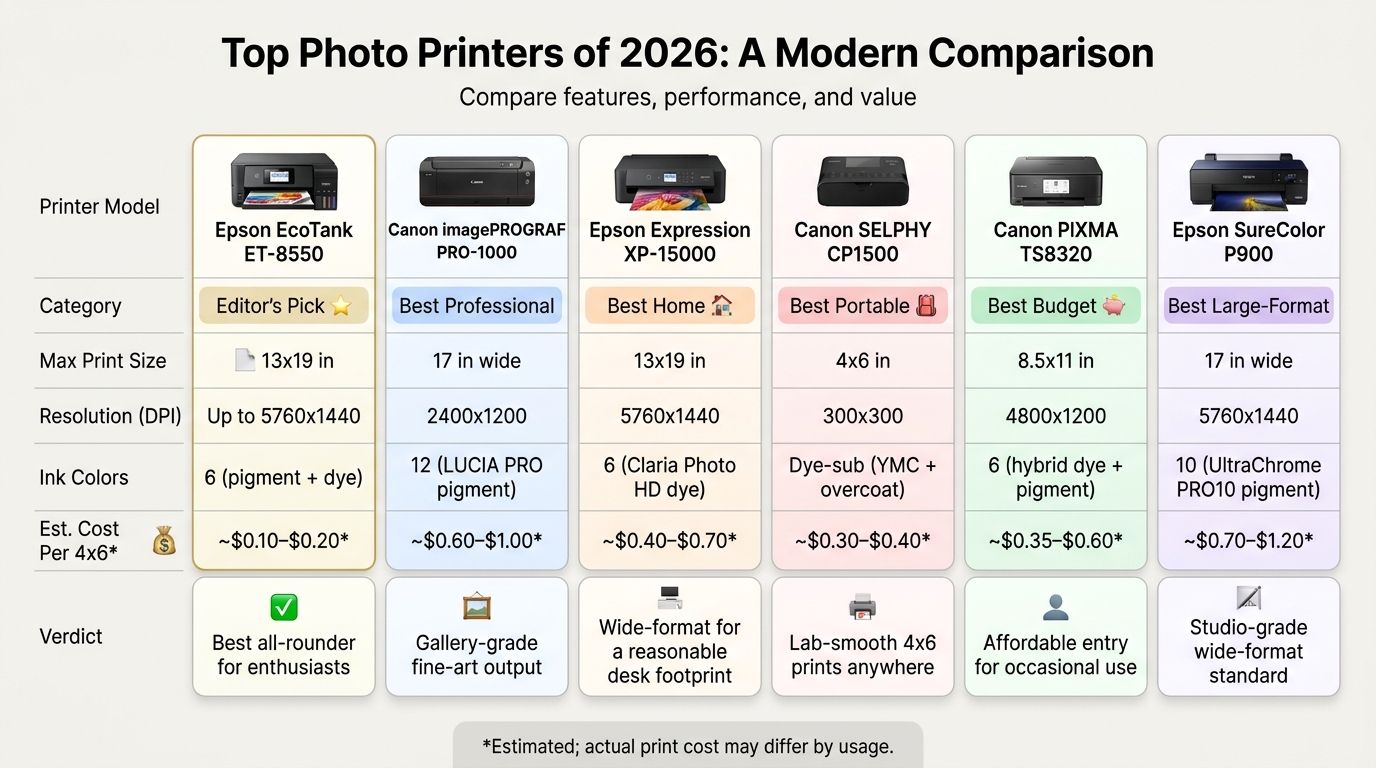
Before we get into individual picks, here's the full field at a glance. Use this table to narrow down which section to jump to.
| Printer Model | Category | Max Print Size | Resolution (DPI) | Ink Colors | Est. Cost Per 4x6* | Verdict |
|---|---|---|---|---|---|---|
| Epson EcoTank ET-8550 | Editor's Pick | 13x19 in | Up to 5760x1440 | 6 (pigment + dye) | ~$0.10–$0.20 | Best all-rounder for enthusiasts |
| Canon imagePROGRAF PRO-1000 | Best Professional | 17 in wide | 2400x1200 | 12 (LUCIA PRO pigment) | ~$0.60–$1.00 | Gallery-grade fine-art output |
| Epson Expression XP-15000 | Best Home | 13x19 in | 5760x1440 | 6 (Claria Photo HD dye) | ~$0.40–$0.70 | Wide-format for a reasonable desk footprint |
| Canon SELPHY CP1500 | Best Portable | 4x6 in | 300x300 | Dye-sub (YMC + overcoat) | ~$0.30–$0.40 | Lab-smooth 4x6 prints anywhere |
| Canon PIXMA TS8320 | Best Budget | 8.5x11 in | 4800x1200 | 6 (hybrid dye + pigment) | ~$0.35–$0.60 | Affordable entry for occasional use |
| Epson SureColor P900 | Best Large-Format | 17 in wide | 5760x1440 | 10 (UltraChrome PRO10 pigment) | ~$0.70–$1.20 | Studio-grade wide-format standard |
| Epson SureColor P700 | Best for Black & White | 13 in wide | 5760x1440 | 10 (UltraChrome PRO10 pigment) | ~$0.60–$1.00 | Neutral, archival monochrome |
| Epson Expression ET-7750 | Runner-Up | 13x19 in | 5760x1440 | 6 (EcoTank dye) | ~$0.15–$0.25 | Lower-cost EcoTank alternative |
*Cost-per-print figures are researched estimates calculated from manufacturer page-yield data and representative ink prices at time of writing. Actual costs vary by quality mode, paper brand, and current ink pricing.
⚠️ Prices Change Frequently > > Printer prices and ink costs shift constantly. All price-related figures in this guide were researched at time of writing. Always verify current pricing via official retailer or manufacturer pages before purchasing — a $600 printer this week may be $499 next week, and ink availability affects true cost of ownership.
How We Evaluated These Printers
Photography Launchpad doesn't physically test printers. Instead, we built our shortlist by aggregating manufacturer spec data, independent lab measurements, and the published consensus of established photography reviewers. Here's exactly what went into each pick:
- Print resolution: Stated native DPI from manufacturer specification pages, cross-checked against real-world sharpness commentary from DPReview and PetaPixel.
- Ink system: Number of ink channels, pigment versus dye formulation, and refillable versus cartridge supply.
- Maximum print size and media compatibility: Supported paper sizes, weight (GSM) ranges, and specialty media handling (roll feed, fine-art, canvas).
- Estimated running costs: Cost per 4x6 print calculated from manufacturer page-yield figures and representative ink prices at time of writing.
- Connectivity and ease of use: Wi-Fi, USB, Ethernet, AirPrint, Mopria, and manufacturer mobile app support.
- Archival longevity: Manufacturer-stated ratings, cross-referenced with independent testing from Wilhelm Imaging Research where available.
- Aggregated user and reviewer feedback: Reliability patterns and real-world print quality from RTINGS, Consumer Reports, and major photography publications.
Evaluation Criteria at a Glance
- Print resolution (native DPI, not interpolated maximums)
- Ink system: color count, pigment vs. dye, refillable vs. cartridge
- Maximum print size and supported paper weights
- Estimated cost per 4x6 print from page-yield data
- Connectivity: Wi-Fi, USB, Ethernet, and mobile protocol support
- Manufacturer-published archival ratings, cross-checked with Wilhelm data
- Aggregated user and expert reviewer sentiment from established sources
No printer makes the list without current availability through major retailers. No printer stays on the list if there's a widely reported reliability issue in the published reviewer consensus.
Our Top Photo Printer Picks
Here are the eight printers that earned a spot, organized by use case:
- Editor's Pick: Epson EcoTank ET-8550
- Best Professional: Canon imagePROGRAF PRO-1000
- Best Home: Epson Expression XP-15000
- Best Portable: Canon SELPHY CP1500
- Best Budget: Canon PIXMA TS8320
- Best Large-Format: Epson SureColor P900
- Best for Black-and-White: Epson SureColor P700
- Runner-Up: Epson Expression ET-7750 (EcoTank)
Editor's Pick: Epson EcoTank ET-8550
The ET-8550 earns the top spot because it does the one thing that matters most for anyone who prints more than a few photos a month: it kills the cartridge-replacement treadmill. You refill the ink tanks from bottles, and a single set of bottles lasts for hundreds of prints.
Key specs (per the Epson EcoTank ET-8550 product page):
- Six-color pigment-black-plus-dye ink system
- Borderless prints up to 13x19 inches (A3+)
- Resolution up to 5760x1440 DPI
- Wi-Fi, Wi-Fi Direct, USB, Ethernet
- 4.3-inch color touchscreen, auto-duplex
Pros: - Dramatically lower running costs than cartridge-based rivals - Six-color system produces strong skin tones and smooth gradients - Wide-format capability up to 13x19 inches - Excellent third-party paper support with downloadable ICC profiles - Touchscreen interface is genuinely usable
Cons: - Higher upfront purchase price than budget alternatives (expect around $700, verify current pricing) - Large desk footprint - Initial ink fill takes time
What we think: If you print photos regularly and you're tired of paying $30 for a cartridge that empties in two sessions, this is the printer to buy. The upfront premium pays for itself over the first year of regular use. Just note that Epson's marketing claims about ink savings assume a specific print volume — the real-world break-even depends on how much you actually print. We'd call it the best all-round photo printer for serious enthusiasts.
Best Professional Photo Printer: Canon imagePROGRAF PRO-1000
If you're selling prints, mounting gallery shows, or doing commissioned fine-art work, the PRO-1000 is the printer the industry gravitates toward.
Key specs (per the Canon imagePROGRAF PRO-1000 product page):
- 12-color LUCIA PRO pigment ink system (including Chroma Optimizer)
- Maximum 17-inch print width
- 2400x1200 DPI resolution
- Dedicated matte black and photo black inks (no switching required)
- Ethernet, Wi-Fi, USB
Pros: - Exceptionally wide color gamut covering most of Adobe RGB - Chroma Optimizer gives glossy prints a uniform surface sheen - Outstanding archival ratings in independent Wilhelm Imaging Research testing - Air feeding system helps minimize printhead clogging - Simultaneous matte and photo black means no ink-swap wait
Cons: - Large, heavy footprint (not a desk printer in any normal sense) - High initial cost (expect well above $1,000) - Full ink-set replacement is a significant expense
What we think: Unmatched for professional fine-art and exhibition printing under 17 inches. Overkill for anyone not selling or exhibiting prints. If your prints are going on client walls or gallery walls, this is the standard.
Best Photo Printer for Home: Epson Expression XP-15000
The XP-15000 hits a specific sweet spot: wide-format capability without the industrial desk real estate of the EcoTank or SureColor models.
Key specs:
- Six-color Claria Photo HD dye ink
- Borderless prints up to 13x19 inches
- Individual ink cartridges (replace only what runs out)
- Wi-Fi, Wi-Fi Direct, USB, Ethernet
- Auto-duplex for standard letter prints
Pros: - Wide-format output in a reasonably compact chassis - Good color accuracy for home use - Individual cartridge replacement reduces waste - Rear feed supports heavier fine-art papers
Cons: - Slower print speeds in top-quality mode (plan on several minutes per 13x19 print on glossy photo paper at highest quality) - Dye-based inks have shorter archival life than pigment systems - Cartridge costs add up for high-volume printers
What we think: Ideal for home photographers who occasionally want to print a 13x19 panorama or portrait but don't need professional archival longevity. Pair it with Epson Premium Photo Paper Glossy and the matching ICC profile and you'll get prints that genuinely impress.
Best Portable Photo Printer: Canon SELPHY CP1500
The SELPHY CP1500 is the odd one out on this list — the only dye-sublimation pick — and it earns its spot because nothing beats it for portable 4x6 printing.
Key specs (per the Canon SELPHY CP1500 product page):
- Dye-sublimation with overcoat layer
- 300x300 DPI resolution
- Prints up to postcard/4x6 size
- Wi-Fi, USB-C, AirPrint support
- Optional rechargeable battery pack
Pros: - Genuinely compact and portable - Lab-smooth, photo-booth-quality prints - Overcoat makes prints water- and fingerprint-resistant out of the printer - Battery option works for events, weddings, markets - Dry, finished prints in about a minute
Cons: - Limited to postcard/4x6 output - Paper and dye ribbon sold as matched kits (you can't mix brands) - Per-print cost higher than high-volume inkjet
What we think: The top choice for event photographers, hobbyists at markets, and anyone who wants a dedicated snapshot printer. If you print 4x6s and nothing else, this beats every inkjet in convenience.
Best Budget Photo Printer: Canon PIXMA TS8320
If you want decent photo output without the upfront commitment of an EcoTank, the PIXMA TS8320 is the smart entry point.
Key specs:
- Six-color hybrid ink system (five dye + one pigment black)
- Prints up to 8.5x11 inches (letter)
- 4800x1200 DPI
- Individual ink tanks
- Wi-Fi, AirPrint, Mopria, Canon PRINT app
- 4.3-inch touchscreen
Pros: - Good color accuracy for the price - Compact enough for most desks - Individual tanks reduce replacement waste - Strong mobile printing support - Dedicated gray ink improves black-and-white and skin tones
Cons: - Not wide-format — capped at letter size - Cartridge-based running costs add up quickly for high-volume use - No Ethernet
What we think: A smart starting point for casual photographers. You'll want to upgrade to the ET-8550 once your print volume grows or you start printing wider than letter size.
A quick note on what to avoid in this price bracket: the HP ENVY 6055e and similar entry-level all-in-ones are not photo printers in any meaningful sense. Ink economy is poor and the four-color ink system limits photo quality. If your budget is tight, the TS8320 is a much better home for your money.
Best Large-Format Photo Printer: Epson SureColor P900
For photographers and artists who need to deliver prints up to 17 inches wide — think gallery exhibitions, art fairs, client commissions — the P900 is the go-to standard.
Key specs:
- 10-color UltraChrome PRO10 pigment ink
- 17-inch maximum print width
- Roll and cut-sheet media support
- 5760x1440 DPI
- Wi-Fi, Ethernet, USB
- Touchscreen interface and Epson's Print Layout software
Pros: - Exceptional detail and color gamut - Roll media support for panoramic and batch printing - Simultaneous photo and matte black inks - Strong Wilhelm-tested archival ratings on compatible papers - Compact for its capabilities
Cons: - Significant investment in printer and inks - Realizing the quality potential requires a calibrated monitor and paper-specific ICC profiles - Learning curve on roll media handling
What we think: The professional large-format standard for studio and gallery printing under 17 inches. If you're selling prints or doing serious fine-art work, this is where your money goes.
Best for Black-and-White Photography: Epson SureColor P700
The P700 shares the P900's ink technology in a smaller 13-inch chassis, and it's the pick for photographers whose work lives or dies on monochrome tonality.
Key specs:
- 10-color UltraChrome PRO10 pigment ink
- Dedicated Photo Black, Matte Black, Gray, and Light Gray inks
- 13-inch maximum print width
- 5760x1440 DPI
- Wi-Fi, Ethernet, USB
Pros: - Exceptional monochrome neutrality (minimal color cast in shadows and highlights) - Full color gamut performance when you need it - Excellent archival ratings on compatible fine-art papers - No wait when switching between photo and matte black
Cons: - 13-inch width ceiling (step up to P900 for 17 inches) - Premium pricing - Full ink-set replacement is expensive
What we think: The best choice for dedicated black-and-white fine-art printing at home or in a studio. Color work is excellent too, but monochrome is where this printer genuinely separates from cheaper rivals.
Runner-Up: Epson Expression ET-7750 (EcoTank)
If the ET-8550 is out of stock or over budget, the ET-7750 delivers the same EcoTank refillable-ink advantage at a lower entry price.
Key specs:
- Six-color EcoTank refillable dye ink
- Prints up to 13x19 inches
- Wi-Fi, Ethernet, USB
- Auto-duplex
Pros: - Lower upfront price than the ET-8550 - Same refillable ink cost advantage - Wide-format capability - Good color output for most home and enthusiast work
Cons: - Dye-based inks (narrower gamut and shorter archival life than ET-8550's pigment black) - Older interface than the ET-8550 - May be harder to find new as stock cycles turn over
What we think: A solid second choice if the ET-8550 is unavailable. Verify stock before committing — Epson rotates models frequently in the EcoTank line.
Running Costs & Ink Economy: What Does It Really Cost to Print a Photo?
Ink is where photo printers quietly bleed your wallet. The printer itself is a one-time cost. Ink, over the lifetime of the machine, often costs more than the printer did.
Here's a realistic range: a 4x6 print on a standard cartridge-based inkjet typically costs $0.40 to $0.70 once you account for ink and paper, while the same print on a refillable EcoTank system can drop to around $0.10 to $0.25. Dye-sublimation kits land around $0.30 to $0.40 per 4x6 because paper and dye ribbons come packaged together at a fixed cost. Actual figures vary by printer model, quality mode, and current ink prices — always verify.
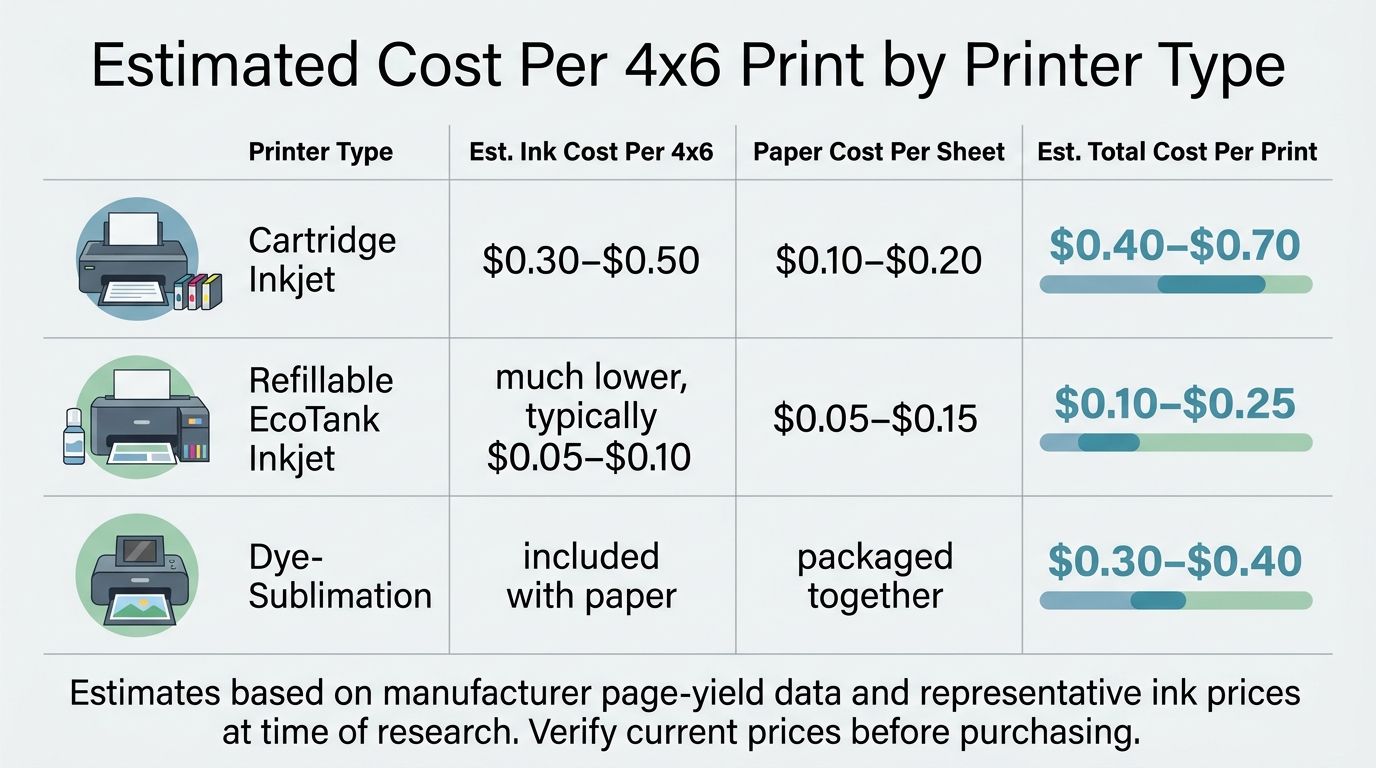
Estimated Cost Per 4x6 Print by Printer Type
| Printer Type | Example Models | Est. Ink Cost Per 4x6 | Paper Cost Per Sheet | Est. Total Cost Per Print | Notes |
|---|---|---|---|---|---|
| Standard CMYK cartridge inkjet | HP ENVY 6055e, basic all-in-ones | $0.30–$0.50 | $0.10–$0.20 | $0.40–$0.70 | Limited photo quality from 4-color system |
| Six-color cartridge inkjet | Canon PIXMA TS8320, Epson XP-15000 | $0.25–$0.45 | $0.10–$0.20 | $0.35–$0.65 | Good quality, cartridge costs add up |
| Refillable six-color inkjet (EcoTank) | Epson ET-8550, ET-7750 | $0.03–$0.10 | $0.10–$0.20 | $0.13–$0.30 | Higher upfront, lowest per-print cost |
| Dye-sublimation (kit-based) | Canon SELPHY CP1500 | Fixed in kit | Fixed in kit | $0.30–$0.40 | Predictable budgeting, lab-smooth output |
Estimates calculated from manufacturer page-yield data and representative ink prices at time of writing. Actual costs vary by quality mode, paper brand, and current ink pricing. Always verify current prices before purchasing.
💡 Ink Subscription Services > > HP Instant Ink and similar subscription programs can reduce per-page costs for casual printers by shipping cartridges based on page usage rather than cartridge count. The economics work for low-to-moderate volume users with standard cartridge printers. High-volume photo printers like the EcoTank and SureColor lines typically have better economics without a subscription — the refillable tanks already deliver the lowest per-print cost in the category. Calculate your monthly print volume before signing up.
⚠️ Manufacturer Ink Savings Claims > > Manufacturer marketing figures — including Epson's stated EcoTank savings — are based on specific volume and quality-mode assumptions. The cost-per-print estimates in this guide are independently calculated from published page-yield data and representative ink prices. Your actual savings depend on how much you print, what quality mode you use, and ink prices at time of purchase.
Cartridge vs Refillable vs Dye-Sub: Which Costs Less Long-Term?
Here's how to think about it:
- Cartridge inkjet: Lower upfront printer cost, higher per-print cost. Best for low-volume printers who do a handful of photos a month.
- Refillable EcoTank / MegaTank: Higher upfront printer cost, significantly lower per-print ink cost. Break-even typically lands within the first year for anyone printing more than 20–30 photos a month.
- Dye-sublimation kit: Predictable, fixed per-print cost. Paper and ribbon are sold together, so budgeting is simple. Best for event and 4x6-only use.
Here's the fix: estimate your realistic monthly print volume, multiply by per-print cost, project over 12 months, and add the printer price. That number — not the sticker price alone — is your true cost of ownership.
Inkjet vs Dye-Sublimation: Which Technology Is Right for You?
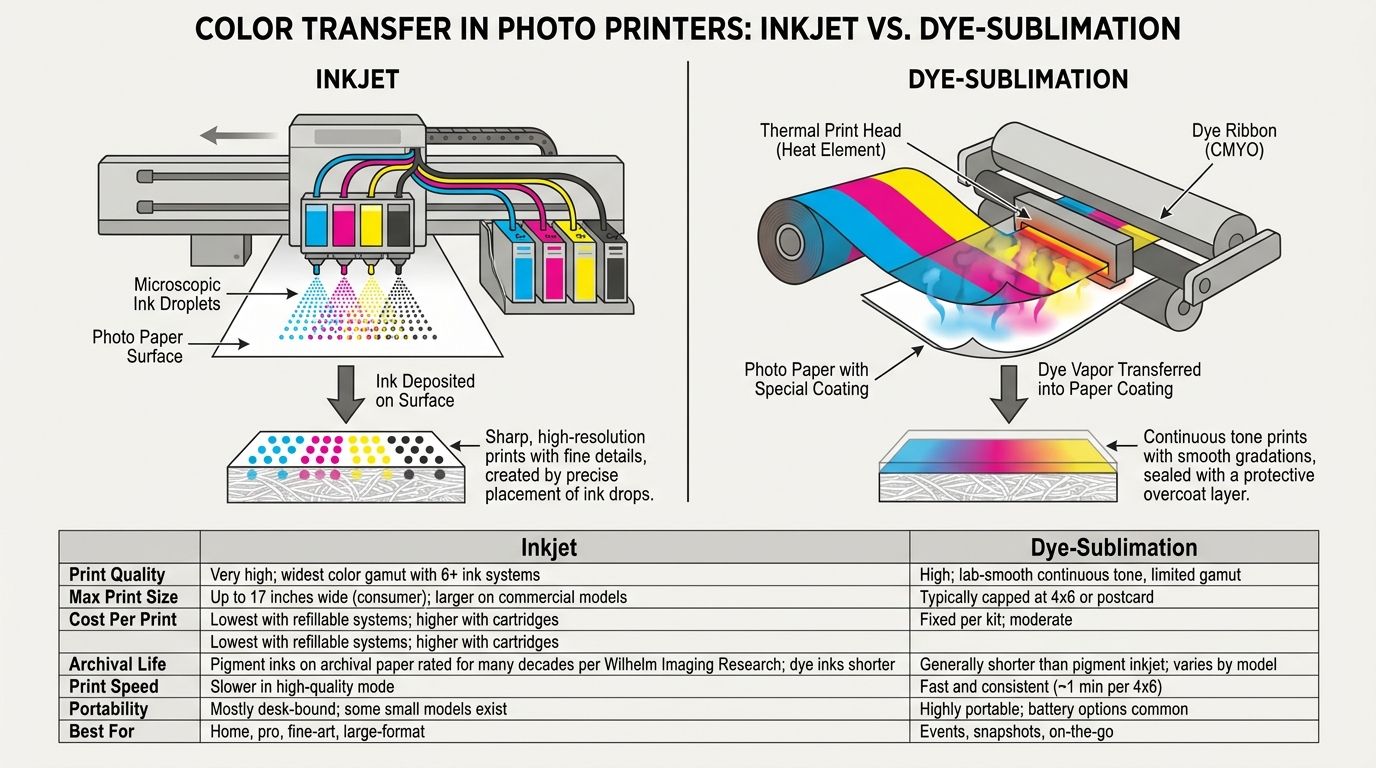
The technology under the hood shapes everything about a printer's output: quality, cost, print size, portability, and how long your prints last on the wall.
| Feature | Inkjet | Dye-Sublimation |
|---|---|---|
| Print Quality | Very high; widest color gamut with 6+ ink systems | High; lab-smooth continuous tone, limited gamut |
| Max Print Size | Up to 17 inches wide (consumer); larger on commercial models | Typically capped at 4x6 or postcard |
| Cost Per Print | Lowest with refillable systems; higher with cartridges | Fixed per kit; moderate |
| Archival Life | Pigment inks on archival paper rated for many decades per Wilhelm Imaging Research; dye inks shorter | Generally shorter than pigment inkjet; varies by model |
| Print Speed | Slower in high-quality mode | Fast and consistent (~1 min per 4x6) |
| Portability | Mostly desk-bound; some small models exist | Highly portable; battery options common |
| Best For | Home, pro, fine-art, large-format | Events, snapshots, on-the-go printing |
🔍 Which Should You Choose? > > Choose inkjet if you print in multiple sizes, want to print above 4x6, need to match calibrated color profiles, or care about archival longevity. Choose dye-sublimation if you mostly print 4x6 snapshots, need portability, or want prints that resist fingerprints and smudging without lamination. For most photographers, inkjet is the more versatile long-term investment.
Getting the Best Print Quality at Home: Paper, Profiles, and Color Management
Buying the right printer is step one. Getting prints that match what you see on screen is where most home photographers hit a wall. Here's the process to fix that, one step at a time.
Choosing the Right Photo Paper
Paper matters as much as the printer. The same image on glossy versus matte versus fine-art paper will look like three different photographs.
| Paper Finish | Best For | Typical GSM Range | Notes |
|---|---|---|---|
| Glossy | Vibrant portraits, landscapes, high-contrast images | 230–280 GSM | Highest sheen and saturation; shows fingerprints easily |
| Luster / Semi-Gloss | Portraits, weddings, general photo work | 240–300 GSM | Most versatile; lab-standard finish; reduced glare |
| Matte | Fine-art work, black-and-white, documents with images | 200–260 GSM | No sheen; easier to handle; slightly narrower gamut |
| Fine Art / Baryta | Gallery and exhibition printing | 300–330 GSM | Textured archival papers; pair with pigment printers |
A few practical notes:
- Luster is the finish most professional photo labs use. It's the safest default for portraits.
- GSM ranges above are typical industry values and vary by manufacturer. Confirm your printer supports the paper weight before buying a heavy pack.
- Fine-art baryta papers demand a pigment-ink printer (PRO-1000, P900, P700) to realize their potential.
ICC Profiles and Soft-Proofing Explained
An ICC profile is a data file that describes how a specific printer-and-paper combination reproduces color. It lets your photo editor simulate on screen what the print will actually look like. The standard is maintained by the International Color Consortium.
Here's the workflow:
- Go to your printer manufacturer's support page and download the ICC profile for your exact paper (not a generic one).
- Install it: on Windows, right-click the .icc file and select Install Profile. On macOS, place it in
/Library/ColorSync/Profiles/. - In Lightroom, go to the Print module → Color Management → Profile, and select your paper profile. Enable soft-proofing in the Develop module to preview before printing.
- In Photoshop, go to File → Print → Color Management, choose "Photoshop Manages Colors," and select your profile.
- Look for out-of-gamut warnings in soft-proof view. Reduce saturation or luminance in affected areas before printing.
- Install the manufacturer printer driver and companion app
- Fill or install ink (check for transport lock or ink initialization process)
- Connect via Wi-Fi or USB and confirm the printer appears in your OS
- Download the ICC profile for your chosen paper from the manufacturer's website
- Install the ICC profile (Windows: right-click > Install Profile; macOS: double-click)
- Open your photo in Lightroom or Photoshop and enable soft-proofing with the ICC profile
- Check for out-of-gamut colors and adjust tone/saturation as needed
- Print a standard test image on the target paper before printing final work
- Compare the test print to your calibrated monitor and adjust if needed
💡 Use Manufacturer ICC Profiles — Not Generic Ones > > Generic printer profiles rarely match actual paper-and-printer combinations accurately. Always download the specific ICC profile from the printer manufacturer's website for the exact paper you're using. Third-party paper manufacturers (Hahnemühle, Canson, Red River) also publish ICC profiles for popular printers on their support pages.
💡 Monitor Calibration Matters Too > > Even the best photo printer can't compensate for an uncalibrated monitor. A hardware calibrator like the Calibrite Display or Datacolor SpyderX produces the most reliable color match between screen and print. If your screen is showing you the wrong colors, you'll adjust your photos to match the wrong reference — and your prints will consistently come out wrong.
How to Choose a Photo Printer: Key Features Explained
If none of the picks above are an exact fit for your situation, here's how to evaluate any photo printer against your own needs.
Key factors to weigh:
- Resolution: Native DPI matters more than interpolated maximums
- Ink system: Six colors minimum; pigment for archival work
- Max print size: Match it to your actual use, not aspirational use
- Connectivity: Wi-Fi for home, Ethernet for studios
- Running costs: Project cost per print over 12 months
- Media compatibility: Confirm paper weight and size support
💡 Match Max Print Size to Your Use Case > > Most home users are well served by a printer that handles up to A4 or letter size. If you regularly print panoramas, portraits, or fine-art pieces larger than 8x10, prioritize a printer that supports 13x19 (A3+) or wider. Buying larger than you need adds cost and desk space without benefit.
Print Resolution: How Much DPI Do You Actually Need?
- DPI measures how many ink dots a printer places per linear inch. Higher DPI generally means finer detail.
- For standard photo prints (4x6 to 8x10), printers with 1200 DPI or higher are generally sufficient.
- Wide-format and fine-art printing benefit from 2400 DPI and above.
- Important caveat: manufacturer-stated maximum DPI is sometimes an enhanced or interpolated figure that exceeds native optical resolution. Compare native DPI when possible.
- Color accuracy, ink formulation, and paper choice often matter more than DPI alone for perceived quality. A 1200 DPI print with correct color management beats a 5760 DPI print with wrong profiles every time.
Connectivity: Wi-Fi, USB, Ethernet, and Mobile
- Wi-Fi: The most convenient for home users; lets multiple devices print without cable management.
- USB: Reliable and fast for a dedicated workstation; impractical for multi-device households.
- Ethernet: Recommended for studio environments with multiple computers; offers stable high-volume printing.
- Mobile and app support: Apple AirPrint, Google Mopria, and manufacturer apps (Canon PRINT, Epson Smart Panel) enable direct smartphone printing.
- Confirm your chosen printer supports your platform (macOS, Windows, iOS, Android) before purchasing — most modern printers do, but older or specialty models can have gaps.
Media Compatibility: Paper Sizes and Specialty Media
- Confirm the printer supports the paper sizes you use most: 4x6, 5x7, 8x10, A4/letter, A3/tabloid, 13x19.
- Check maximum supported paper weight (GSM). Some fine-art papers exceed 300 GSM and won't feed through standard trays.
- Specialty media support (canvas, panoramic roll, CD/DVD) is relevant mainly for professional or large-format printers.
- Rear manual feed slots typically handle heavier papers. Check printer specs before buying premium paper stock.
Frequently Asked Questions About Photo Printers
What is the best photo printer for home use?
For most home users, the Epson EcoTank ET-8550 or Canon PIXMA TS8320 offer the best balance of print quality, running costs, and ease of use. The ET-8550 suits enthusiasts who print regularly in large sizes; the TS8320 suits casual users who print occasionally in standard sizes.
Inkjet vs dye-sublimation: which is better for photos?
Inkjet is more versatile. It supports a wide range of paper sizes, media types, and color profiles, making it the dominant choice for home and professional photo printing. Dye-sublimation produces smooth, smudge-resistant 4x6 prints quickly and is ideal for portable or event printing. For most photographers, inkjet is the better all-round choice.
What DPI do I need for high-quality photo prints?
For standard photo prints up to 8x10 inches, a native resolution of 1200 DPI or higher is generally sufficient. For large-format or fine-art printing, 2400 DPI and above is preferred. DPI alone doesn't determine quality — ink system, paper choice, and color profile setup are equally important.
How much does it cost to print a photo at home?
Estimated costs vary widely by printer type. Cartridge-based inkjet printers typically cost $0.40–$0.70 per 4x6 print, while refillable EcoTank systems can drop to $0.13–$0.30 per 4x6 once the upfront cost is recovered. Dye-sublimation kit costs are fixed per print pack, typically $0.30–$0.40 per 4x6. Actual figures depend on current ink prices, quality mode, and paper. Verify before purchasing.
Which photo printer is best for professional photographers?
The Canon imagePROGRAF PRO-1000 is widely regarded as one of the best professional photo printers for fine-art and exhibition output, offering a 12-color pigment ink system and outstanding archival ratings per Wilhelm Imaging Research. The Epson SureColor P900 is a strong alternative, particularly for roll-media and wide-format studio work.
Do I need special paper for a photo printer?
Yes. Using photo-specific paper (glossy, luster, matte, or fine-art) significantly improves color accuracy, detail, and archival life compared to plain paper. You should also use the printer manufacturer's ICC profile for your chosen paper to ensure accurate color reproduction.
How long do inkjet photo prints last?
Archival life depends on ink type, paper, storage conditions, and display environment. Pigment-ink prints on archival-rated papers can last many decades when stored away from UV light and humidity, according to independent testing by Wilhelm Imaging Research. Dye-based inkjet prints and dye-sublimation prints generally have shorter rated lifespans. Always check the manufacturer's archival rating for specific printer and paper combinations.
Can I print photos from my iPhone or Android phone?
Yes. Most modern photo printers support Apple AirPrint (iPhone and iPad), Google Mopria (Android), and manufacturer apps such as Canon PRINT and Epson Smart Panel. Confirm your chosen printer supports your device's operating system before purchasing.
Sources
- Epson EcoTank ET-8550 Official Product Page
- Canon imagePROGRAF PRO-1000 Official Product Page
- Wilhelm Imaging Research — Print Permanence Ratings
- DPReview — Digital Photography Review
- RTINGS.com Printer Reviews & Ratings
- Canon SELPHY CP1500 Official Product Page
- PetaPixel: Best Photo Printers
- International Color Consortium (ICC)
- Consumer Reports — Printer Ratings
- Epson EcoTank Ink Savings Overview